MAK Data Logger Capabilities
Simulation Recording and Replay
An easy-to-use system for capturing and replaying simulation data and video streams.
Learn all about the MAK Data Logger by clicking through the tabs below or download the MAK Data Logger Capabilities document.
Intuitive Controls and Multiple Views
The graphical user interface (GUI) provides intuitive controls for recording and playback, like those for DVDs or other video players.
The timeline not only tells you where you are in a recording, but allows you to jump back and forth in a recording at will so that you can easily view the data that is most important to you. You can zoom in on the timeline for a finely grained view. You can manipulate the bounds of the timeline to play only a segment of particular interest.
Packet histograms display the number of packets being recorded or played and their size.
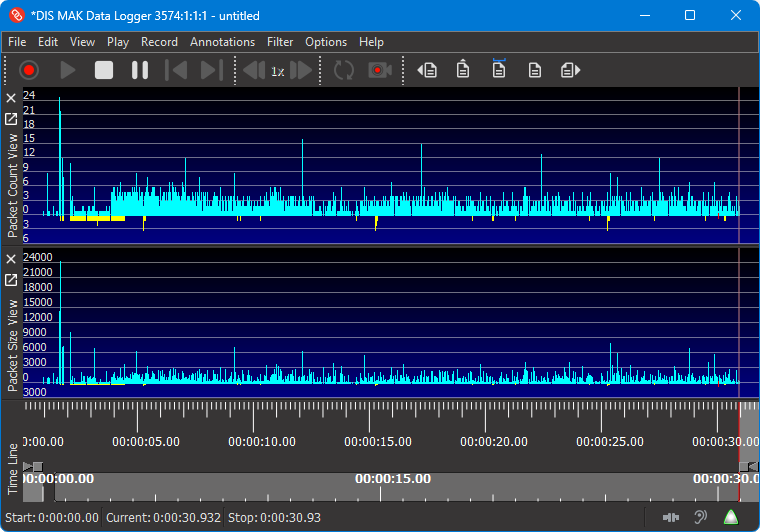
The Logger can display statistics about the objects being published (during playback) or reflected (during recording) by the Logger application.
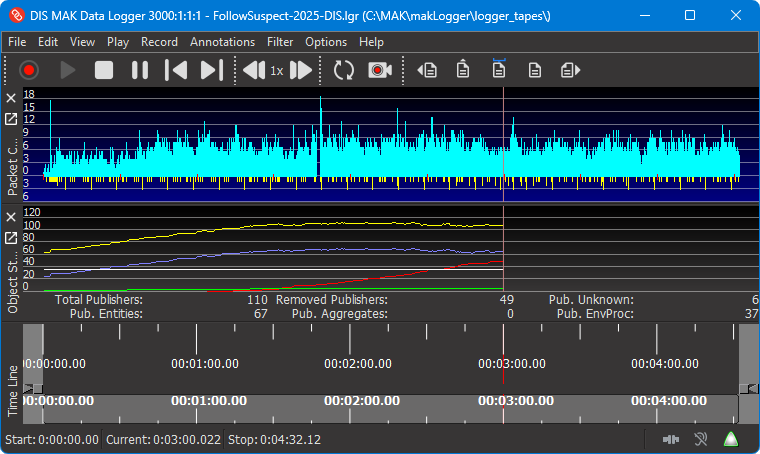
Annotate Files for Review and Analysis
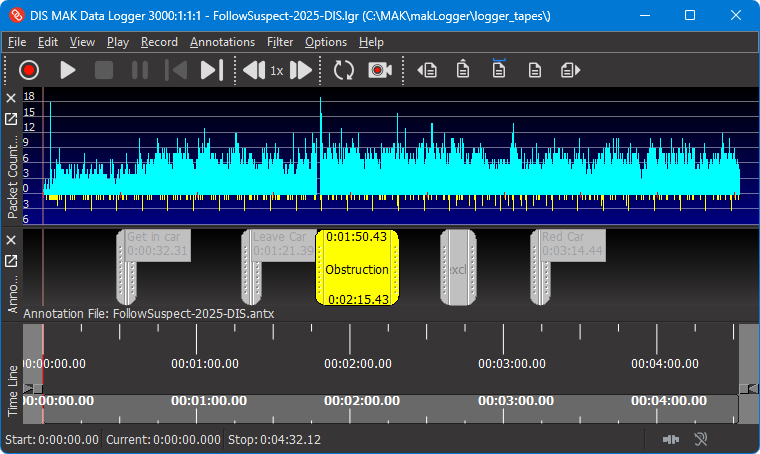
You can annotate Logger files. Point annotations identify a specific time in a file. Range annotations identify a segment of a file. An annotation can be as simple as a label or can contain detailed information.
You can easily zoom the display to a range annotation and bind the playback segment to it.
Record and Play Synchronized Video
You can record video, such as that streamed by VR-Vantage. When you play back the video, it is fully synchronized with the corresponding simulation data. The Logger includes a utility, the Webcam Stream Launcher, that allows you to capture the video from a webcam. This lets you record the actions of human participants in an exercise synchronously with the simulation activity.
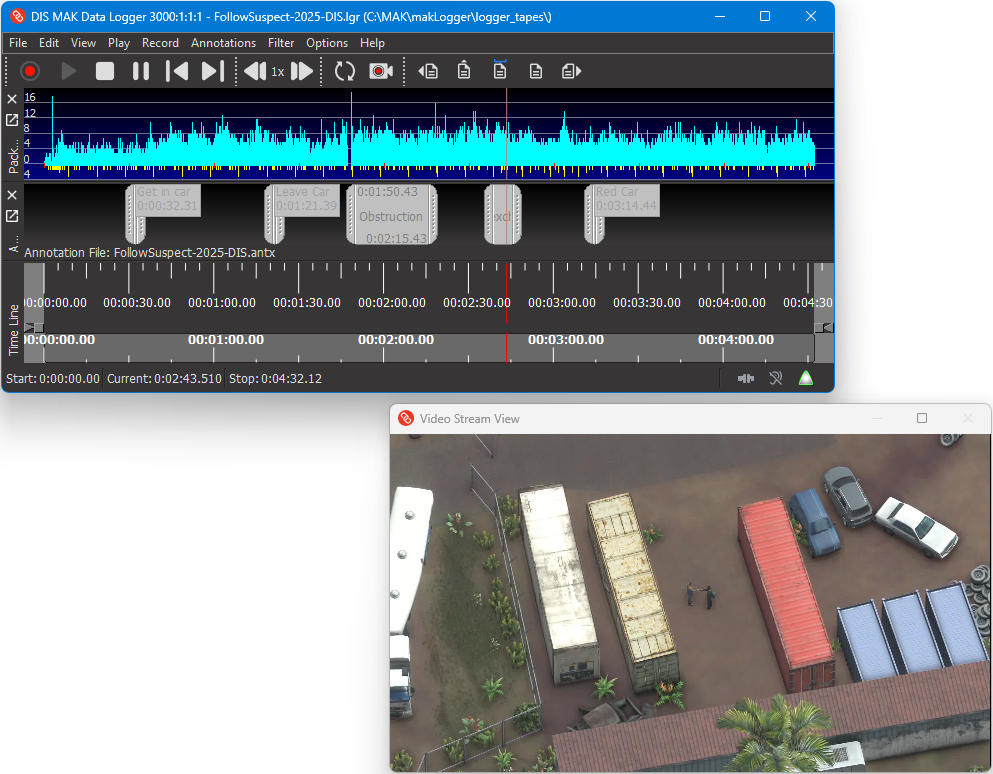
The Logger uses the GStreamer library for video recording and playback and is fully configurable. You can play back video just within the Logger window and you can stream the video back to the network.
Edit Recordings
The Logger enables you to easily edit Logger files. You can:
- Merge files to combine their data.
- Concatenate files.
- Clear packets from a segment of a file (which creates dead space in the file).
- Delete a segment of a file.
- Trim dead space at the beginning of a file.
- Offset the timestamps of the packets in a file.
Filter DIS and HLA Messages
You can filter the messages that the Logger records and sends to reduce network traffic or focus on a particular set of objects or interactions. In DIS and HLA, you can filter by entity type and marking text. In DIS, you can also filter by entity ID and PDU kind. In HLA, you can also filter by class and object name.
Logger File Metadata
The Logger automatically records the following information about a Logger file:
- Protocol
- Date and time of recording
- Length of recording time
- FOM file (HLA only)
- FOM modules (HLA Evolved only)
- A user-supplied description (optional)
This information displays when you open a file, and you can view it at any time while the file is open.
Export Logger Data to Text and ODBC Databases
The Logger can export data to the following formats:
- Text
- Logger file
- MySQL database using ODBC driver
- Microsoft Access database using ODBC driver
Developers can add additional export formats using the Logger API.
Analyze HLA Traffic
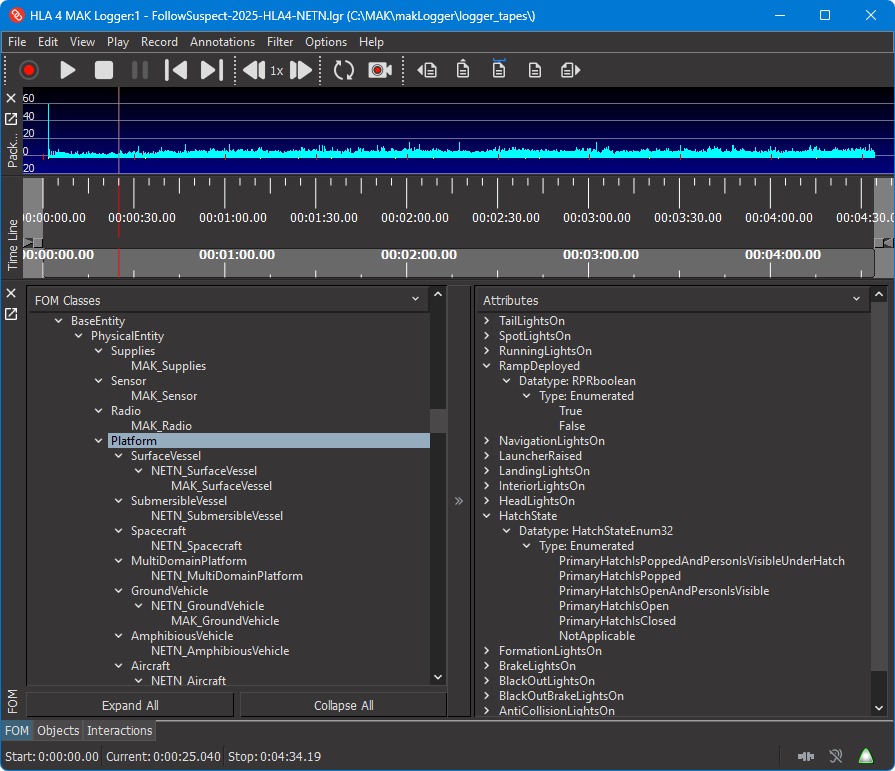
The HLA Traffic Analyzer, which is integrated into the Logger, provides details about the FOM you are using and displays the data for the current known object instances and recent interactions. By examining the classes, you can debug problems that you are experiencing in your federation, such as an entity’s location not being within the area for the scenario or an interaction missing parameter values.
The Logger Supports Large Exercises
The Logger supports strategies for recording large or lengthy exercises: recording to multiple files and using multiple Loggers.
When you record to multiple files, the Logger saves data periodically to file as it continues to record to the primary file. This ensures that - if there is an interruption to the recording process or a problem with the primary file - most of the data is saved to file. This process also allows you to begin viewing recorded data while the exercise is still running.
When you record to multiple Loggers, you can use filtering and other network strategies to send portions of the data stream to separate instances of the Logger. You can manage multiple Loggers from one location with the Remote Control Logger.
The Remote Control Logger
The Remote Control Logger lets you control one or more Loggers from one location. You can record data and play it back from the Remote Control Logger. The primary use for the Remote Control Logger is to provide one point of control when you are using multiple Loggers to record a large exercise.
The Remote Control Logger is protocol-independent. It can control DIS Loggers, HLA Loggers, or both at the same time.
Command Line and Text Interfaces
In addition to the graphical user interface, the Logger has command-line and text interfaces. The Logger has a set of commands that cover most Logger operations. You can use them on the command line, in the text interface, or in the Logger configuration file.
The Logger API
The Logger application programming interface (API) allows you to extend and customize the functionality available in the Logger.
For example, you can embed a Logger in your own executable to play and record Logger files, or you can build and customize your own version of a Logger executable. You can also use the Logger API to build dynamically linked modules, or plug-ins, that the standard Logger executable can load at runtime.
Note: You must have a VR-Link developer's license to build applications or plug-ins that use the Logger API.
The Logger API is logically separated into logging functionality and application functionality. Logging functionality involves the low-level classes responsible for recording simulation data and playing it back. The application functionality provides a GUI, configuration file loader, and other high-level end-user functionality. The API is designed to be extensible, which makes it easier to replace or extend both low-level and high-level functionality.
If your goal in using the Logger API is to add standard Logger features to your own application, the DtLogger and DtLgrInterface classes may be the only portion of the API that you need to understand. (It is possible to use the DtLogger class alone, without any corresponding Logger interface components. However, you would need to implement a way to control the logging process.)
You can use the Logger API as a starting point for writing your own data logging application that uses whichever components of the Logger application that you want. However, you will be limited by project dependencies. For example, if you do not want to use the Qt Toolkit for your GUI library, you cannot use the Logger GUI libraries.
You can extend the Logger application's functionality. Possible extensions could include new file formats, data inputs and outputs, or additional processing of data within the Logger. You can extend the application by completely rebuilding it, or by writing plug-ins.
The Logger Remote Control API
The Logger has a C++ remote control API and a C# remote control API. These APIs allow you to control a Logger application from another application. (For example, the Remote Control Logger uses the remote control API to control other Loggers.)
Sample Programs
The Logger includes the following example programs:
- Simple examples of using the Logger API — playFile, writeFile, recordFile, readFile, exportFileToDatabase, and offsetFile.
- Example plug-ins — stateObserver displays a graph of object statistics. lgrDump prints details of each packet to the console. sampleFilter shows how to filter out selected packets.
- An example Logger application — loggerApp. You can use this example as a starting point for changing and recompiling the Logger application.
- A remote control application — lgrControl.
- A DDM example — sampleDdm shows how to manipulate DDM regions using packet data.
- An example that extends the database export to include the DIS Data PDU — lgrModSqlExporter.
- A FOM mapper — matrexTspiFomMapper. A VR-Link FOM Mapper for the entity attributes of the MATREX FOM for Time and Space Position Information.
For more information about examples, please see the Examples page in the online API documentation.
The Logger Supports DIS and HLA
The Logger is built against VR-Link and — like all MAK ONE products — supports multiple versions of DIS and HLA.
HLA Support
The HLA version of the Logger performs recording and playback while acting as a separate federate. In record mode, by default, it subscribes to all objects, attributes, and interactions in the RPR FOM, and records each update, interaction, and object removal that it perceives through the RTI. It records values for all published attributes of an object by requesting attribute updates as it discovers each new object.
In playback mode, the HLA Logger acts as a federate that owns each of the objects for which updates appear in the file. The Logger sends interactions and updates only for classes that other federates are subscribed to. The Logger serves as a proxy simulator, answering requests for attribute updates and making objectRemove RTI calls when it encounters removals in the recorded file. In addition—just as in DIS—velocities, accelerations, and angular velocities are scaled in outgoing messages when the Logger's time scale is not equal to zero.
If possible, the Logger uses the same object names as those used in the original simulation. If this is not possible—for example, if another federate is using the name—the Logger lets the RTI assign a name for the object in question.
The Logger should work with any RTI that is built to be compliant with the HLA interface specification. This includes HLA 1.3 C++ API, SISO Standard Dynamic Link Compatible C++ API for the IEEE 1516 (HLA 1516) API, and IEEE 1516-2010 (HLA Evolved) C++ API.
Support for HLA Evolved
HLA Evolved is the latest version of the IEEE HLA 1516 standard, which was finalized in August 2010. Logger fully supports HLA Evolved.
DIS Support
The Logger supports DIS 4 through 7. DIS 7 support includes the ability to extend PDUs using arbitrary data and the ability to define different heartbeat values to specific types of entities.
In record mode, the Logger monitors all DIS traffic on a specified UDP port and stores it in a file. In playback mode, the Logger transmits DIS data packets stored in a Logger file. When the playback scale is less than or greater than 1.0, the Logger scales the dynamic quantities stored in the PDUs, such as velocity, acceleration, and so on.
Superior Technical Support
At MAK, technical support is not just an afterthought. Our reputation for supporting our customers is one of the key reasons that people choose our products. When you call or email us with questions, you speak directly to our product developers who know the software inside and out. When you buy MAK's products, you can be sure that MAK will be in your corner as you work towards successful completion of your HLA/DIS project. We've even been known to be on the phone with customers during their HLA certification process or during key events.
When someone reports a bug, our engineers are quick to provide a patch or workaround, meaning you will not have to wait for the next release to have your problem addressed.
With maintenance, you are entitled to upgrades when they are released. Typically, new releases not only add support for the latest versions of RTIs, the RPR FOM, HLA Specifications, and so on, but also try to maintain compatibility with older versions as well. For example, our current release supports many versions of the MAK RTI, includes FOM Mappers for the NETN FOM, RPR FOMs 1.0 and 2.0, and continues to support DIS 4 through 7.



